

Sphero RVR+
SKU:940-0601
Shipping
FREE shipping on orders over £120 inc VAT
Estimated within 2–5 working days
Free Returns
Free returns within 30 days of delivery. No questions asked.
Pairs well with
Sphero RVR+
Product Description
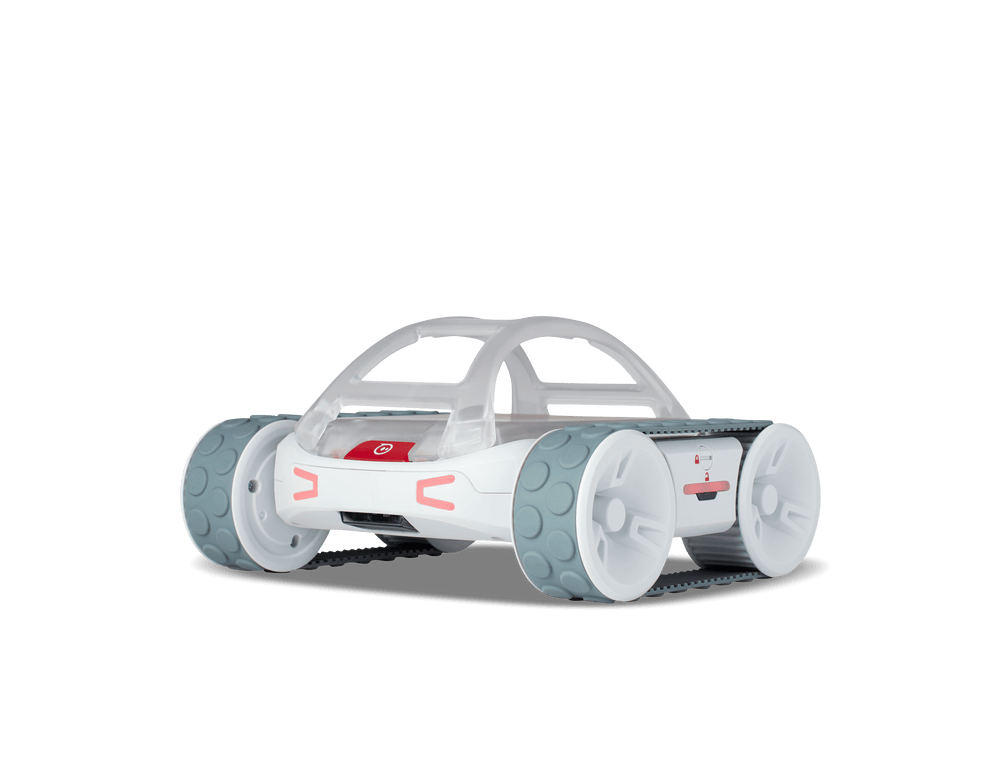
RVR+ is Sphero’s most customisable robot, built for middle and high school classrooms where students are ready to tackle real-world challenges through code. Use it to apply the Pythagorean theorem with sensor data, learn about autonomous vehicles, build delivery bots, and a range of applied programming challenges.
Students start with block-based coding in the Sphero Edu app, then progress to text programming and the Sphero Public SDK. RVR+ connects with third-party hardware like Raspberry Pi or micro:bit, making it a flexible mobile platform for robotics, engineering, and data-driven experiments.
And that’s just the start. RVR+ is your gateway to deeper learning across STEM, CTE, and beyond.
Why Educators Love RVR+:
READY TO GO & ENDLESSLY CUSTOMISABLE: No assembly, no delay—just connect and program. RVR+ is ready for simple exploration or custom builds that expand with programmable sensors, hardware, and modular add-ons.
REAL SENSORS, REAL DATA, REAL THINKING: Includes a color sensor, light sensor, IR, gyroscope, and accelerometer so students can build programs that interact with their environment in real time.
BEGINNER TO ADVANCED PROGRAMMERS: Start with blocks, then move into JavaScript or Python. With the Public SDK and third-party hardware integrations, you can take even more creative control.
MORE THAN STEM: From robotics and environmental science to geometry and logic, RVR+ brings concepts to life across computer science, math, and engineering and empowers students to build what they imagine. Access lessons and resources for RVR+ on Sphero Central.
BUILDS FOUNDATIONS FOR AI LITERACY: Through coding and debugging, students build programming and critical thinking skills to understand how AI works and use it responsibly—covering algorithms, data structures, pattern recognition, logic, conditional reasoning, and computer science fundamentals.
Device Compatability
Sphero Edu App: Code using Draw, Blocks, or Text (Python and JavaScript). Access lessons and manage your classroom. Chrome, Mac, PC, iOS, Android, Kindle
Sphero Edu Web App: Allows you to program from your browser—no app download required. Provides faster implementation for classrooms with app download limitations. This is a great solution if you use a Chromebook, macOS or Windows device.
What's in the box
Product Specifications
| Brand | Sphero |
| Model name / number | SKU:940-0601 |
Curriculum Alignment