Expert curated STEAM products
Education support included
Curriculum ready resources
Schools can pay by invoice

Product Description

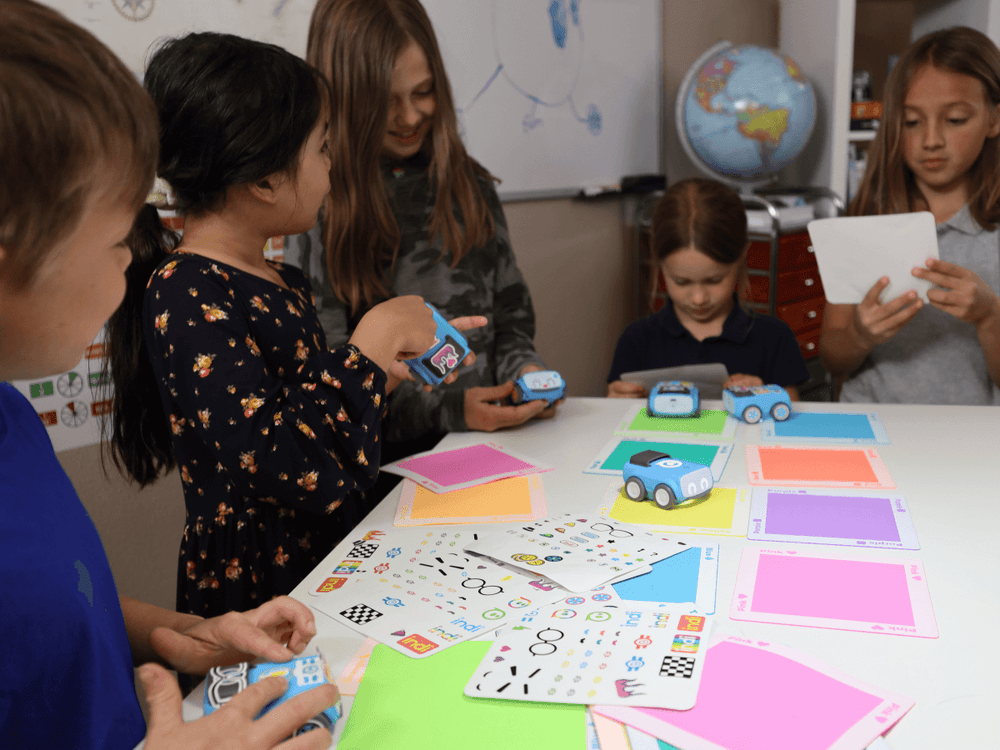
Turn screen-free play into problem solving with indi. Young learners build computational thinking skills through colour, movement, and creative play, progressing to block-based coding when they’re ready.Students place colour tiles, each one a coded instruction, and watch as indi navigates a course or maze. Whether they’re modeling a classroom routine, retelling a story’s plot, or solving a puzzle, kids learn through interactive play.Along the way, students develop essential skills like color identification, sequencing, decomposition, pattern recognition, and cause and effect. When they’re ready, the Sphero Edu Jr™ app lets them reprogram indi with block-based code—customizing movements, sounds, and colors for new challenges and endless fun.

Screenless to Screen Ready

Students start by placing colour tiles to learn computer science basics—no devices required—to explore logic and movement and progress with simplified drag-and-drop programming in the Sphero Edu Jr™ app.

Play based, Cross-Curricular Learning:

Use indi to improve reading fluency, explore math patterns, or model life cycles in science—all while reinforcing directionality, storytelling, and observational skills.

Exploration with Structure

The included Challenge Cards and standards-aligned lessons offer scaffolded guidance while still leaving room for creative, open-ended exploration.

Built for Early Learners:

indi is intuitive, durable, and rechargeable. Built to withstand busy classrooms and excited hands, indi provides flexibility to grow alongside students' skills.

Device Compatibility:

A device is not required to use indi - indi can be programmed without a screen using the included color tiles. Students can level up by changing how indi responds to color tiles using simplified block coding language with the free Sphero Edu Jr™ app. Compatible with most Chrome, Mac, iOS, Android, and Kindle devices - learn more about Sphero Edu Jr™ Device Compatibility.


What's in the box

  • 1 indi Robot
  • 20 durable latex free rubber colour tiles
  • 1 wipe clean student carry storage case
  • 15 Beginner's Programming Challenge Cards
  • 1 quick start guide
  • 2 decorative sticker sheets
  • 1 charging cable
  • Educator resources
  • Downloadable guides & lessons plus more

.

Need more information?

Product Specifications

Brand Sphero
Dimensions INDI robot: 7.62 cm (L) × 6.99 cm (W) × 3.81 cm (H) Color Tiles: 15.24 cm (L) × 15.24 cm (W) Student Carry Storage Case: 54.61 cm (L) × 26.67 cm (W) × 26.67 cm (H)
Model name / number SKU:980-0530

Curriculum Alignment

Sphero indi™ Student Kit
  • Build early skills through play and discovery
  • Students develop foundational computational thinking skills while connecting coding to everyday learning.
  • Practice color identification, sequencing, and pattern recognition
  • Explore decomposition, directionality, and cause-and-effect relationships
  • Use movement and storytelling to reinforce reading and observational skills
  • Explore math patterns and model concepts like life cycles in science
  • Progress from unplugged colour programming to basic block coding
  • indi turns early programming concepts into playful learning experiences across the curriculum.
Get in Touch
Mother and daughter enjoying a coding game with colorful obstacles, fostering creativity and learning together.

Sphero Edu & Play

Sphero Edu is the Sphero app for programming Sphero robots. From draw and drive commands to block-based or even JavaScript text programming, Sphero Edu focuses on learner progression.
Go beyond code by incorporating STEAM activities to complete with your bot. Join the growing community, share your creations to inspire and be inspired, and keep track of your class all in one place. Preparing for the future has never been so fun.

Download

Students engaged in a classroom activity using tablets and robotic devices to learn coding and technology skills.

Designed to be taught in the classroom

Computer Science Foundations (CSF) is a standards-aligned, curriculum designed to be taught in the classroom alongside Sphero robots.
Learn computer science and STEAM principles over three courses, with each customized lesson allowing teachers and students to learn and grow together.

If you’ve been looking to integrate CS content into your STEAM classroom, look no further.

Shop now

Children and teacher joyfully engaging in a creative art project with colorful balls and tablets.

Standards alignment

All Sphero products have curriculum and activities that are aligned to various national/international, and state standards. Sphero is committed to providing the tools you need to implement Computer Science in your classroom.

View more

Group photo of attendees at Creative Hut booth showcasing Makey Makey at a technology event.

Let us support you

We don’t just provide resources, we are with you every step of your creative education journey. We recommend resources based on your goals, we build confidence through workshops, training & events and we design amazing learning spaces.

Call us today and together we inspire the creators of tomorrow!

Contact us